 ShootersBO1 Zombies
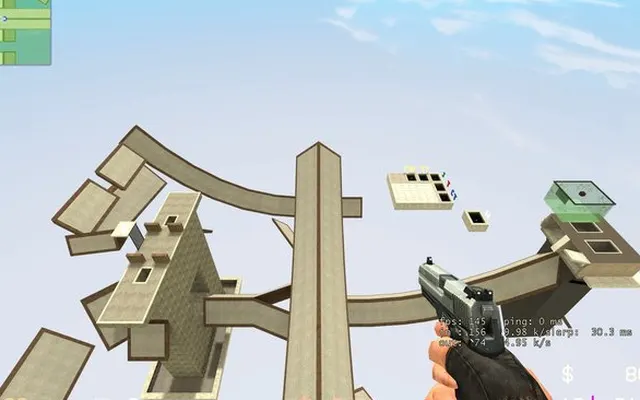 ShootersCS Surf
Shooters
CS Surf
Ready to playDesktop
Trade gunfights for movement. Follow ramps, preserve momentum and practise your route in a browser surf project.
surfd.net ↗
Listed as browser-ready. Availability depends on the project host.
Before you play
The Boreas map loaded, but mouse capture prevented starting a run in our automated browser check. Use a desktop browser with keyboard and mouse.
- Choose Solo and a map, then wait for Ready to surf.
- Select a display mode and Play. The game needs mouse capture to start a run.
- Use Settings to review sensitivity and controls; Escape opens the menu.
Controls
The project lists W/A/S/D movement, Space or mouse wheel to jump, Shift to duck and R to restart.
October 10, 2026 · Apple silicon Mac · macOS 27.0 · Codex in-app browser and Chrome. Map/menu checked; a playable run was blocked by mouse capture.
Questions before you play
Do I need an account for Solo?
The map menu offers a guest run. Signing in is offered for saving ranked times.
Why does Play return to the menu?
Our browser check showed a mouse-capture message. The project recommends desktop Chrome or Edge; click Play in the browser window.
Is this a Counter-Strike match?
This entry is a surf movement game with maps and timed runs. We did not verify multiplayer matches.
We link to this project but do not run it. Features, content and availability may change independently of this directory.
Browser game optimization
CS Surf: performance & optimization FAQ
Which CS Surf setting helps when FPS is low?
Open Settings → Video & audio and lower Rendering quality. The project says this changes resolution and texture filtering without changing physics or mouse input. Enable Show frame rate and compare the same section of one map.
Should I enable Interpolate camera position?
Interpolation smooths camera movement between physics ticks, but the project documents about 15 ms of visual delay. Mouse look remains immediate. Try both settings on the same ramp: smoother motion and less visual delay are different preferences, not a universal best setting.
What browser checks should I try for CS Surf?
Keep the game tab visible and pause other games or video. If Chrome Energy Saver is active, compare with it off while plugged in; restore it if there is no benefit. Change one thing at a time and repeat the same scene. Export any available save backup before clearing site data or switching browser profiles.
For browser settings and a step-by-step diagnosis, read How to optimize browser games.
Reviewed October 10, 2026. Suggestions are troubleshooting steps, not measured performance gains.
Sources & further reading